Unify Data, Tools, and Processes for Seamless Automation, Empowering Your Team to Drive Business Growth.
Transform your operations, enhance client relationships, and achieve unprecedented levels of efficiency and success.
Automated data entries and marketing leads accelerate response time by over 12%.
Cost savings of over 16% due to automated lead management and marketing processes.
230+ Manpower hours saved(every month) through the automated assignment of leads and inquiries.
More consolidated data increased marketing ROI by over 122% in just 6 months.
97% customer retention due to a personalized and customer-centric approach.
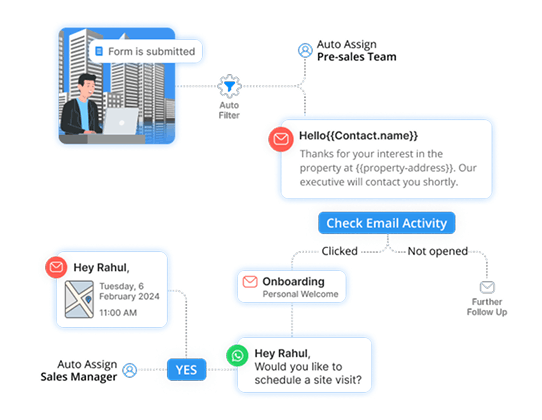
Lead Generation & Management
Attract more prospects with our robust lead generation tools. Our CRM not only helps you capture new inquiries but also efficiently manages and nurtures these leads to increase conversion rates.
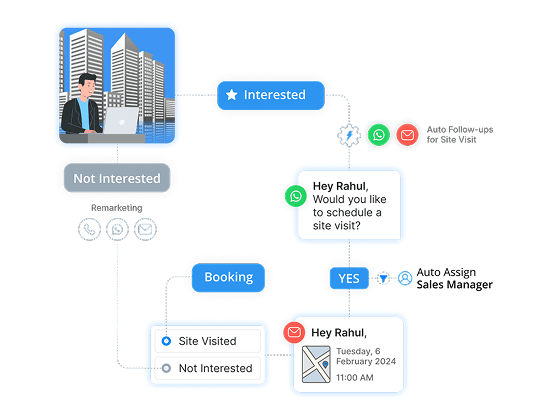
Automated Follow-ups
Stay top-of-mind with your clients through automated follow-up communications. Our system ensures that no potential deal slips through the cracks, enhancing client engagement and satisfaction.
Site Visit Coordination
Easily schedule and manage property site visits. Our CRM integrates scheduling tools that facilitate seamless coordination between your agents and clients, ensuring a smooth and professional experience.
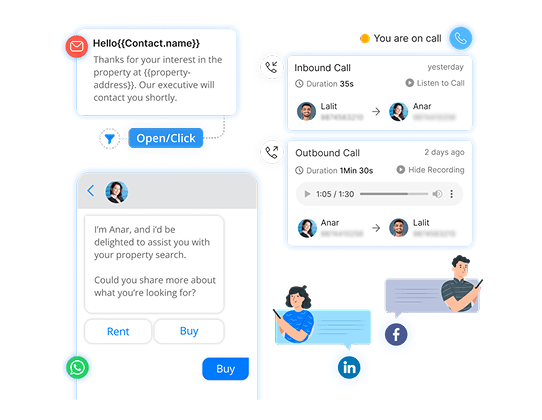
All-Channel Communication
Communicate with clients via their preferred channels. Whether it's email, SMS, social media, or phone calls, our CRM provides a unified platform for all your communication needs, ensuring a consistent and personalized client experience.
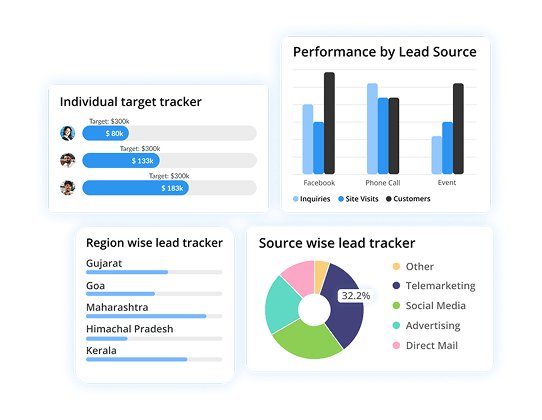
Reporting & Analytics
Gain valuable insights into your business performance. Our CRM's advanced analytics tools help you track key metrics, understand market trends, and make data-driven decisions to grow your business.
Admin Module
Manage Users
The admin can seamlessly access and input multiple user details through an easy and quick process.
Assign Roles
The admin accesses the user creation section, inputs user details, and can even assign roles to the new user.
Manage Roles
The system allows the admin to create new roles and define permissions for each role, while easily managing each & every user!
Marketing Module
Lead Capture
The system monitors incoming leads, storing them in the CRM and segmenting them based on predefined criteria (e.g., location, property type, budget).
Email Campaigns
The marketing manager can create and design email campaigns. They can choose target recipients and their preferences.
Automated Follow-Ups
The marketing manager can set up automated follow-up emails triggered by lead actions, such as property views or clicks.
Property Listings
The system matches property listings with leads' preferences. Property updates and new listings are automatically sent to leads.
Behavior Tracking
The system tracks lead interactions with emails, website visits, and property views. The data is stored for further customizations.
Lead Scoring
The system assigns scores to leads based on engagement level, actions taken, and demographic data.
Property Portal Integration
The system captures leads from different property portals and stores them in the CRM.
Social Media Integration
The marketing manager can automate property listings and updates on social media platforms. They can even engage with leads through automated responses.
WhatsApp and SMS Marketing
Sales representatives can send property brochures via WhatsApp and other crucial information via SMS and WhatsApp.
Multi-channel Marketing Campaigns
The marketing manager can integrate WhatsApp and SMS messages into multi-channel marketing campaigns.
Sales Module
Lead Management
The system captures and stores leads from various sources and even prioritizes them based on scores, engagement, and demographics.
Lead Assignment
The system automatically assigns leads to agents or sales representatives based on predefined criteria.
Contact Management
Sales representatives can maintain a comprehensive database of contacts, including buyers, sellers, investors, and other stakeholders.
Pipeline Management
The sales manager can manage sales pipelines that reflect the stages of the real estate sales process, from lead to closing, and can even track the progress.
Quoting Management
Sales representatives can generate and manage sales quotes and proposals for diverse prospects.
Territory Management
The sales manager can define and manage sales territories and assign sales representatives accordingly.
Call Integration
Sales representatives can make calls from the CRM system with click-to-call functionality, call recording, and call history tracking.
Property Tracking
Sales representatives can keep track of available properties, including details like property type, location, features, price, and status.
Task and Activity Tracking
Sales representatives can schedule and manage tasks, appointments, follow-ups, and reminders within the Frappe CRM.
Site Visit Management
Sales representatives can keep track of which properties clients have visited, when they visited, and their feedback on the same as well to get a better idea.
Real-Time Updates
The system sends real-time updates to field agents about upcoming customer visits, so they can prepare for customer visits and provide better service.
Document Management
Sales representatives can store and organize important documents, such as contracts, agreements, property documents, and client paperwork.
Forecasting and Goal Tracking
The sales manager can set sales targets for agents and track progress toward achieving them for better management and achievement of goals.
Commission Tracking
The CRM system calculates and tracks commissions for agents based on closed deals.
Report
Lead Conversion Analysis
You can get a lead conversion report showing the number of leads generated from different sources and how many of them progressed to become clients or closed deals. Include a conversion rate analysis.
Marketing Campaign ROI
You can easily generate an ROI report that compares the total cost of each marketing campaign with the revenue generated from leads generated by those campaigns.
Property Performance Analysis
Get an end-to-end property performance dashboard that includes metrics like the number of property views, inquiries, offers received, and average time on the market for each property listing.
Agent/Productivity Metrics
Get individual agent performance reports, including lead conversion rates, the number of deals closed, and response times to inquiries. Compare performance across agents and teams.
Sales Forecasting
Get a sales forecasting model that uses historical data and trends to provide estimates of future sales, helping to plan resources and set realistic targets.
Site Visit Analysis
You can create a site visit analysis report that includes data on which properties are most visited, the average duration of visits, and feedback from site visitors.
Goal Tracking
Set and track their goals within the CRM. Provide goal-tracking reports that show progress over time and allow for adjustments.
Territory Performance Analysis
Generate territory performance reports with data on leads generated, conversions, and revenue within each territory. Visualize performance trends and allocate resources accordingly.
Call Analytics
Get call analytics reports with metrics such as call volume, average call duration, and outcomes (e.g., appointment scheduled, lead generated). Identify peak calling times and agent performance.
Price Trend Analysis
Easily create price trend reports that show historical and current price trends for specific property types or locations. Make pricing decisions based on market fluctuations.
Multi-Channel Marketing Analysis
Analyze the performance of marketing campaigns across different channels, including social media, email, and online advertising. Show which channels yield the highest ROI and engagement.
Customer Journey Mapping
Create customer journey maps that visualize the steps clients take from initial contact to closing a deal. Identify touchpoints and opportunities for personalized interactions.
Sanskar Technolabs Real-Estate CRM software is a versatile solution that can be beneficial for various types of real estate businesses.
Real Estate Agencies
Real estate agencies, whether in commercial or residential, and also both can use this CRM to streamline their operations by efficiently managing leads, appointments, and communication with clients. They can track lead sources, assign leads, monitor lead progress through the sales pipeline, and ensure a personalized and efficient client journey.
Property Developers
Property developers can also leverage the CRM to manage and market their real estate developments. They can keep property details organized, track site visits, and effectively engage with potential buyers. Additionally, the CRM provides tools for managing leads generated from marketing campaigns and other things in mind as well.
Real Estate Brokerages
This CRM can also be used by real estate brokerages to enhance their lead management and agent productivity by using this CRM. It allows them to efficiently assign leads to agents based on predefined criteria and optimize the entire sales process. Furthermore, the CRM's reporting and analytics can help brokerages monitor diverse agents' performance and their brokerages based on sales and conversions.
Property Rental Agencies
Property rental agencies can use the CRM to streamline inquiries related to rental properties. They can manage and organize rental property details, schedule site visits, and facilitate communication between renters and property owners. The CRM can also be used to engage potential renters through marketing campaigns.
Individual Real Estate Agents
Independent real estate agents can even manage their leads, appointments, and marketing efforts more effectively using this CRM. It offers lead management tools, automated follow-ups, and the ability to integrate communication channels like WhatsApp, calling, email, and SMS. This allows individual agents to provide a higher level of service to their clients.
Real Estate Investors
Real estate investors can benefit from the CRM by tracking their investments, analyzing property performance, and engaging with potential buyers or renters. The software helps investors make data-driven decisions by providing insights into property trends and performance.
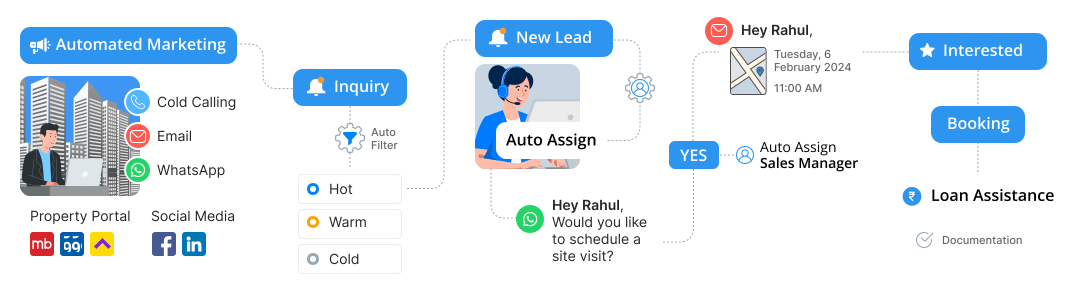
Sanskar Technolabs has set itself apart in the development of its CRM product for real estate businesses by implementing a range of innovative approaches and industry-focused strategies.
Here are some of the ones we implemented:
Customization for the Win
Sanskar Technolabs understands that the real estate industry is highly diverse, with different types of businesses having unique needs. To address this, we have designed the CRM to be highly customizable to meet the specific requirements of different real estate companies, enabling them to mold the CRM as per their workflows and processes.
In-depth Understanding of Industry Challenges
The team at Sanskar Technolabs has gained first-hand experience and insights into the challenges that real estate businesses face. This comprehensive knowledge and insights have helped our team create a CRM that addresses these challenges directly, ensuring that the product is highly relevant and effective for real estate businesses.
Focus on Cost-Savings and Enhanced Customer Experience
Real estate companies usually deal with high operational and marketing costs. Sanskar Technolabs has designed the CRM with a focus on cost-savings by automating many manual and time-consuming tasks. By streamlining processes, the CRM not only saves money but also enhances the customer experience.
Keeping Up with Development Trends
To create a CRM that is both current and future-ready, Sanskar Technolabs has continuously updated and evolved its product in line with the latest development trends and best coding practices. This commitment to staying up-to-date ensures that the CRM remains technologically relevant and secure.
User-Centric Design
The CRM is designed with a strong focus on the user experience. Sanskar Technolabs has paid close attention to user-friendly interfaces, intuitive navigation, and efficient workflows to ensure that the software is not only powerful but also easy to use. This, in turn, increases user adoption and overall productivity.
Integration Capabilities
The CRM has been designed with the ability to integrate with various external systems, allowing real estate companies to connect their CRM with other tools and platforms they use in their daily operations. This integration helps to centralize data and streamline processes.