Leads on Autopilot: Switch to Automated Benefits with ERPNext + Indiamart Integration!

Ever feel the stress of juggling leads and inquiries from IndiaMart & worried about missing out on potential business? Worry not!

Introducing Sanskar Technolab's game-changing ERPNext and Indiamart Integration.

Icon

Imagine this - within every 5 minutes, your IndiaMart inquiries seamlessly sync with your ERPNext system, with no manual hassle.

Icon

It's like having a virtual assistant dedicated to lead management! Say goodbye to lead loss fears, as our feature-packed system simplifies the entire process, making lead tracking and conversions a breeze.

Icon

Boost your business with Sanskar Technolab's ERPNext-Indiamart Integration – where leads flow in, and conversions flow out effortlessly!

ERPNext-IndiaMart Integration Product Features Unveiled!

Comprehensive Dashboard Insights

Gain end-to-end tracking and make data-driven decisions effortlessly with our comprehensive dashboard.

check list

Time-wise tracking: Daily, weekly, monthly, and overall inquiry count.

check list

Status-wise tracking: Open, converted, repeat, do not contact, and not interested inquiries.

Trends and Analysis

Visualize inquiry trends and types with dynamic graphical representations for informed decision-making.

check list

Gain end-to-end insights about the leads and their effective comparison and overview through graphical representation.

check list

Analyze trends for strategic planning and make result-driven decisions.

Past History Fetching

Retrieve all past leads from Indiamart to ERPNext seamlessly, ensuring a complete historical record.

check list

Fetch historical data effortlessly & ensure a comprehensive overview of past leads.

check list

Add the start and end date (of 7 days) to get details of leads generated within that timeframe.

Fetch Inquiries with Customizable Filters

Easily search and sort leads with filters like name, status, contact info, and more using customizable filters.

check list

Efficient data retrieval with customized filtering.

check list

Fetch inquiries on the go based on specific criteria.

Automated Inquiry Type Updates

Experience automated updates to the inquiry type based on customer behavior, ensuring accurate categorization.

check list

Streamline inquiry-type updates.

check list

Enhance accuracy through automation.

check list

Real-time lead updates every 5 minutes.

Generate Comprehensive Lead Forms

Create detailed lead forms instantly post-lead conversion, ensuring all necessary details are captured and effective management is possible.

check list

Generate lead forms seamlessly & capture comprehensive lead information.

check list

Effortlessly view and manage all inquiries in Indiamart with user-friendly navigation.

The Ultimate Guide You Need to Integrate ERPNext with Indimart: Getting Started!

Before getting started with the process of installing and setting up the calling integration system within your ERPNext - you need to abide by the following:

Pre-requisites

List

Indiamart Authorization Key:

Here's how you to get your authorization key:

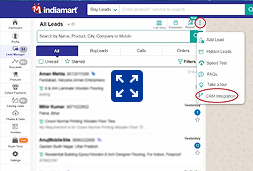
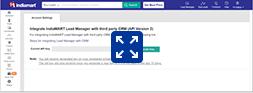
Indiamart > lead manager > Menu > CRM integration

CRM Integration

Generate Authorization Key

CRM Integration
List

Registered Mobile Number with Indiamart

At the time of Indiamart registration, the mobile number number which you have added, the same will be added here

Step 1:

Installing the App:

You need to install our calling integration on your Bench or Site.

Go to your bench or site, select app tabs > Add app > Search the app(Indimart integration by Sanskar Technolab)

You can choose our app and install it easily (after making the payment of $12).

Step 2:

Enabling Indimart settings:

After installing, you will be redirected to the Indiamart workspace.

Go to the Indiamart settings and click to enable it.

Step 3:

Adding the required details:

After enabling, one form will appear, you need to add the Indiamart URL, Authorization Key, and registered mobile number with Indiamart.

(Check the prerequisites for seamless set-up)

Step 4:

You are all set:

The set-up has been completed. Now, you can go to the Indiamart inquiries to check whether all the inquiries have been fetched or not.

Bonus

You can even fetch the past inquiries. Just add the start date and end date(of 7 days) and you will get inquiries.

TESTIMONIALS

What our customers are saying?

Hear in their Words!

I've been a client of Sanskar Technolabs for years, and they recommended this lead tracking and management solution for streamlined processes. The out-of-the-box features and the simple setup process made it a breeze to manage leads effectively. Now, we can easily track and follow up with leads, resulting in a significant boost in conversions.

Our team has across Indiamart ERPNext integration products on the frappe marketplace. Earlier, our team was struggling with inefficient lead tracking, and management, ending up wasting their time to keep up with leads. This product streamlined everything and helped our team save time & costs.

We are using Excel and other MS tools for lead tracking and management through Indiamart. That’s when we stumbled upon this lead management gem on the Frappe Marketplace. The features were exactly what our business needed to streamline the Indiamart and ERPNext leads. Lead tracking was a mess, but this solution turned chaos into order. The straightforward approach and seamless tracking saved us time and headaches.

Frappe marketplace includes so many amazing integrations and plugins available. And, we have come across Indiamart and ERPNext integration - the integration we didn’t know we needed. We were doing fine, but considering the features - we have decided to give it a try. After the installation, the results are amazing. It has not only helped us in lead tracking and management but has also resulted in time & cost savings.

We were manually processing Indiamart leads and repeatedly failing to follow up, losing valuable opportunities for us. Following this integration in ERPNext, lead assignment and response time have significantly reduced. Automated syncing of leads has reduced the workload on our sales team, and we've received improved response rates and quicker conversions. A prerequisite for every Indiamart user using ERPNext.

This integration has totally revolutionized how we deal with our sales pipeline. We previously were plagued by disjointed data and irregular lead updates. Sanskar Technolabs' integration of IndiaMART consolidated all into one system, providing us with real-time visibility of leads coming in. Not only has it saved us time but has also introduced accountability and improved reporting into our sales workflow.

FREQUENTLY ASKED QUESTIONS

ERPNext-Indiamart Integration is a powerful solution that seamlessly connects your IndiaMart inquiries with the ERPNext system, ensuring real-time updates and streamlined lead management. It can help you with end-to-end lead tracking, efficient data retrieval, and automated updates for better decision-making.

Get ready to transform your business

Join hundreds of business

contact us Now!
chatbot