
Frappe App
Follow-Up Management
Introduction
Follow-Up Management App for Frappe ERPNext – the ultimate solution for efficient follow-up management. With Lead and Quotation at its core, tracking follow-ups becomes effortless, providing a centralized hub for all your follow-up-related activities within a single screen. The app enables tracking of all follow-ups, organizing them based on status and priority, offering reminder functionality, and furnishing Detailed Reports, a Kanban Board, a Calendar View, a Dashboard, and a Dedicated Workspace.
Key Features
- Manage Follow-Ups of Sales Persons.
- Enhanced User Interface.
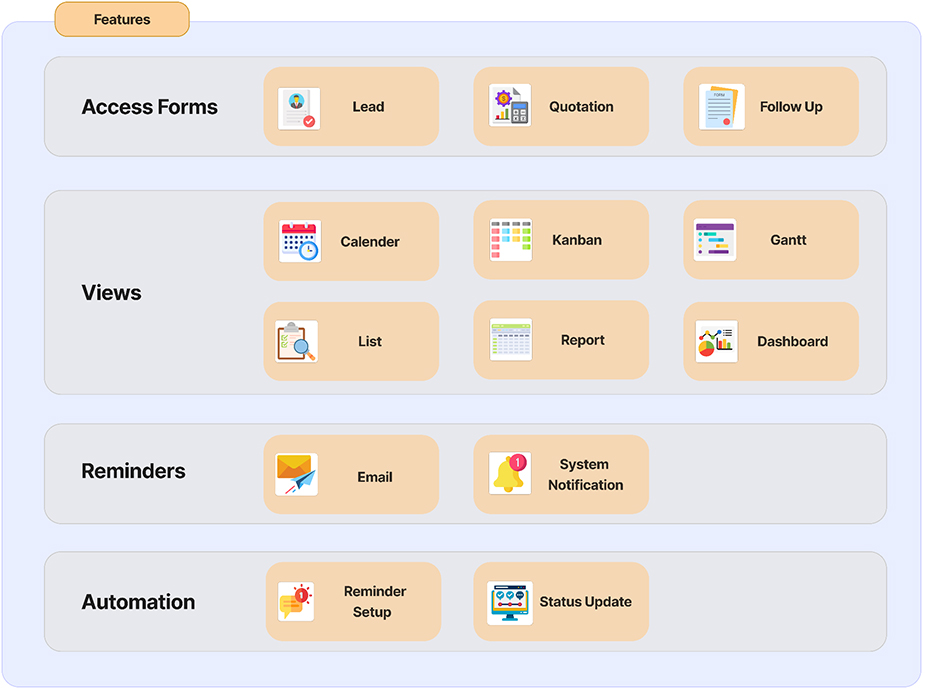
- Includes Calendar View, Gantt View, Custom Dashboard, Kanban Dashboard, and Custom Report for analytics purposes.
- Directly accessible for the Lead and Quotation.
- Email and System Notifications will be sent as a reminder 30 minutes before the scheduled time.
- Automatically update status.
- Easy to customize.
Use Case
Customer Inquiry Follow-up
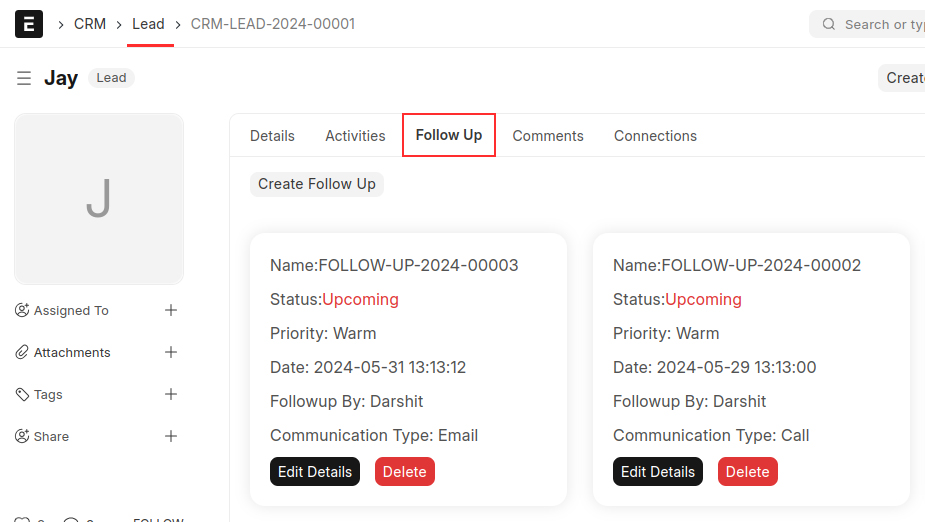
When a customer sends an inquiry through email, website, or phone, it is managed as a Lead in ERPNext. The sales team logs the inquiry into the system and schedules follow-up actions for the Lead. Additionally, the system can:
- Assign inquiries to specific sales representatives based on predefined criteria.
- Automatically generate acknowledgment emails to inform customers their inquiry has been received.
- Set reminders for follow-up actions to ensure timely responses.
- Directly accessible for the Lead and Quotation.
- Track the status and history of each Lead, providing insights into customer interactions and follow-up effectiveness.
- Integrate with CRM to provide a holistic view of customer engagement.
Quotation Follow-up
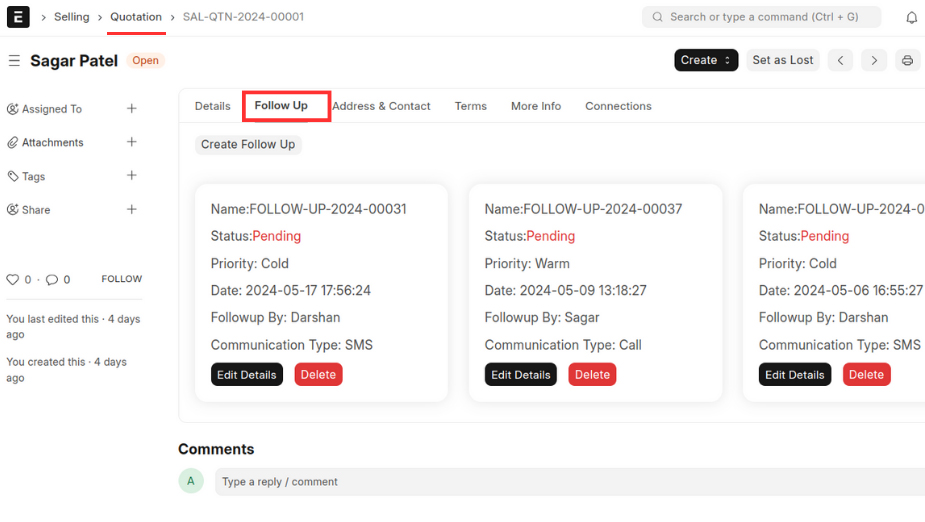
After sending a quotation to a customer, the sales team can check its status in the ERP system. They can also set up automated reminders to follow up with customers who haven't responded to quotes within a set time. Additionally, the system can:
- Notify sales representatives when a customer views a quotation.
- Enable customers to accept or decline quotes directly through a self-service portal.
- Provide analytics on quotation acceptance rates and follow-up effectiveness.
- Schedule follow-up tasks and track progress within the sales pipeline.
- Customize follow-up messages based on customer segmentation and quotation value.
- Integrate with email and messaging platforms to streamline communication.
Installation
Pre-requisites
- Install ERPNext
- Setup Default Email Account
Step 1:
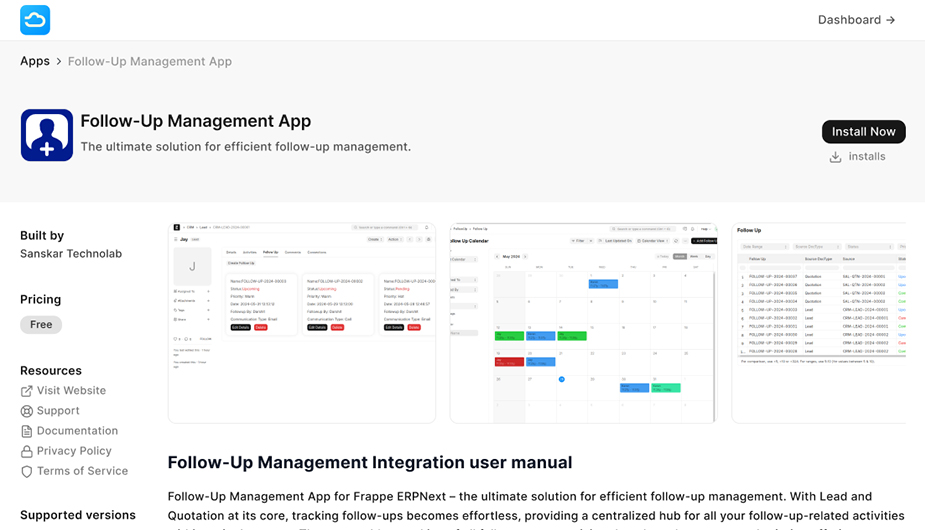
Install the product:
You can access our product through the Frappe marketplace. To install our product, you need to pay monthly fees of $10.
Step 2:
Getting Started:
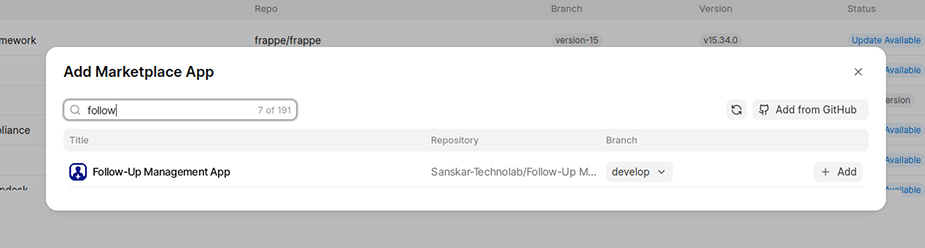
After installing our integration product, to get started you have 3 different scenarios.
- If you already have a site, you just need to install our product.
User Manual
01. Flowchart
02. Workspace
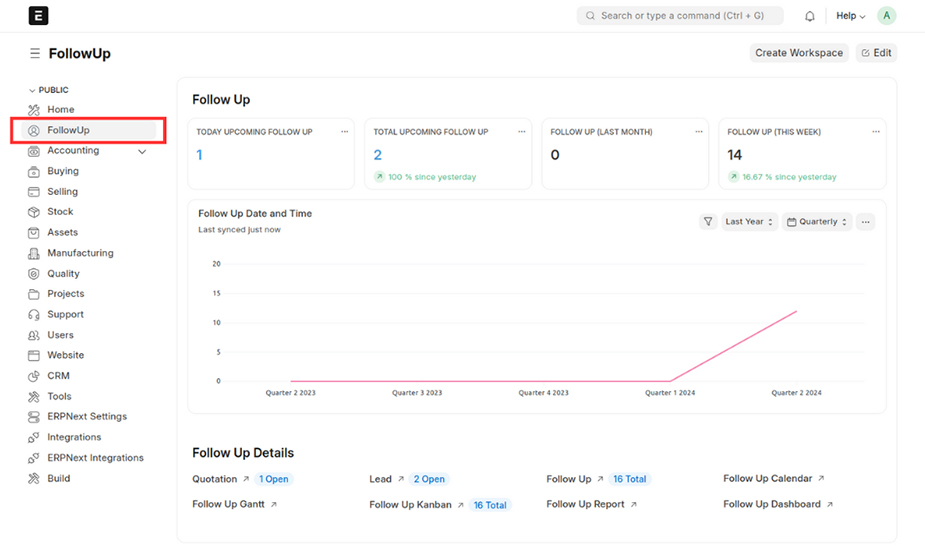
- In the Follow-Up workspace, you can access the lead, quotation, follow-up, follow-up calendar, Gantt, Kanban, dashboard, and report views.
03. Lead
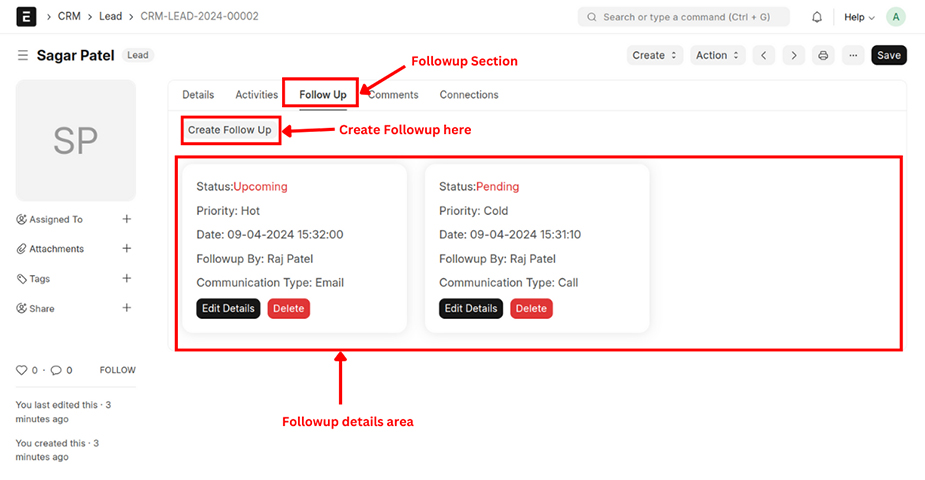
- In the Lead doctype, there's a section called "Follow Up" where you can create new follow-ups, remove existing ones, and make updates as necessary.
03.01. Add New Follow-up
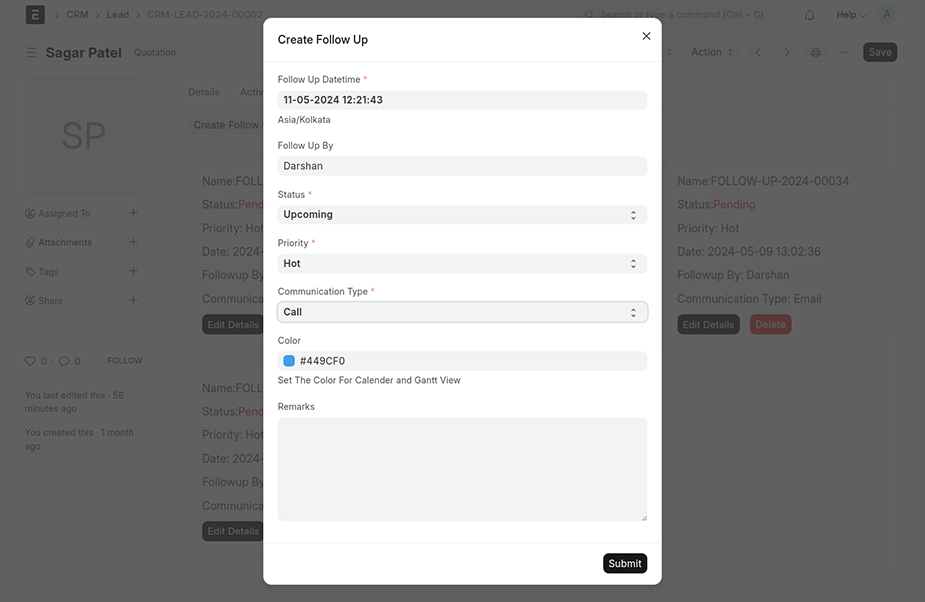
- Click the "Create Follow-up" button to generate a new follow-up.
- After generating the follow-up, showcase it within the follow-up details section, with specific fields.
03.02. Update Follow-up
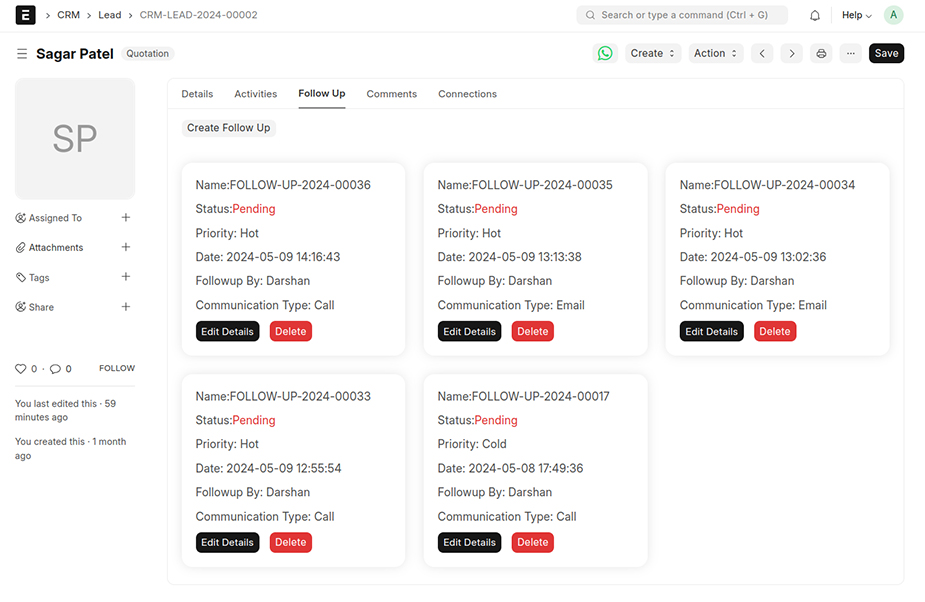
- To update follow-up details, click the "Edit Details" button on the corresponding card.
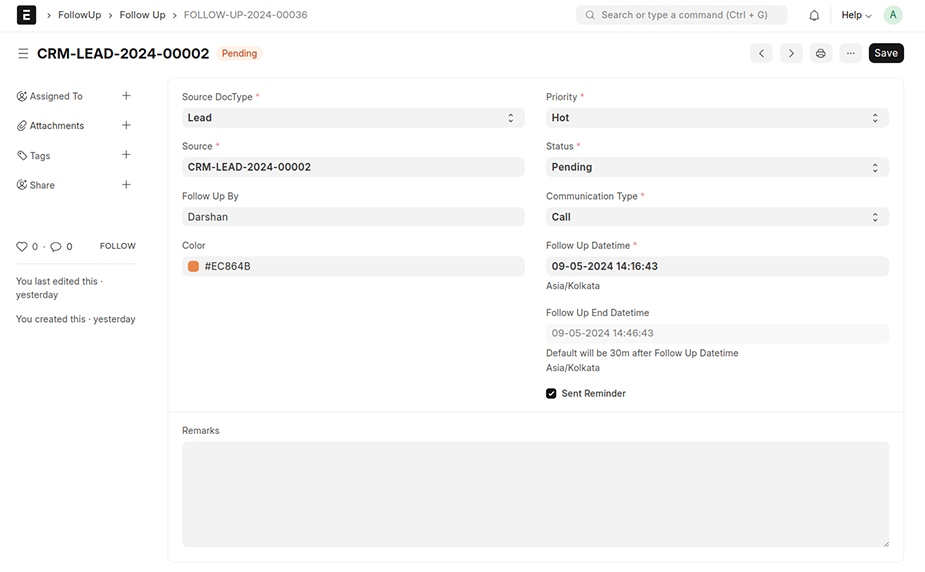
- Which will redirect to the specific follow-up details form where you can make the necessary updates.
03.03. Delete Follow-up
- To delete a follow-up, click the "Delete" button, and if you confirm by clicking "Yes," a confirmation message will appear before deleting the follow-up.
04. Quotation
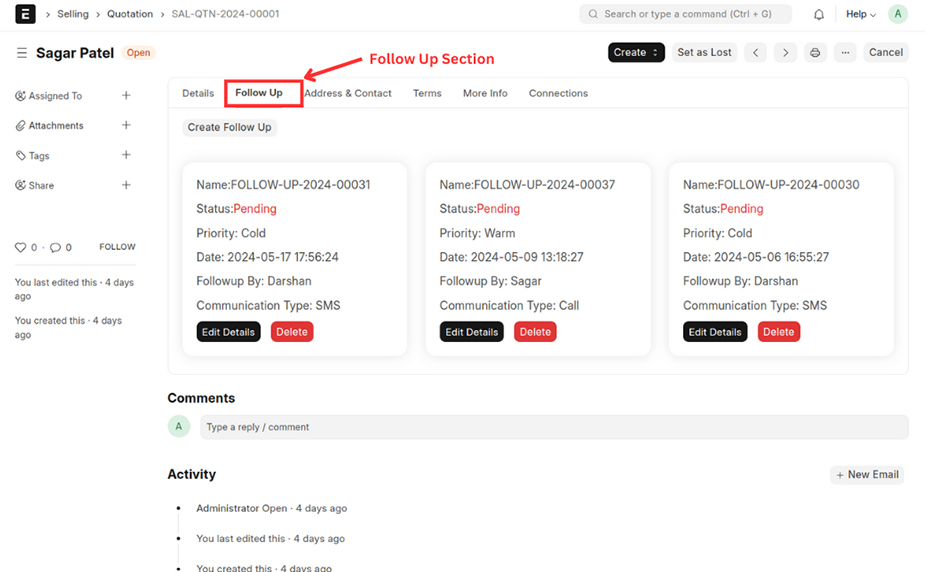
- In the Quotation doctype, there's a section "Follow Up" where you can create new follow-ups, remove existing ones, and make updates as necessary.
- The process for creating, updating, and deleting follow-ups in the quotation follow the same steps as the lead.
05. Follow Up
05.01. List View
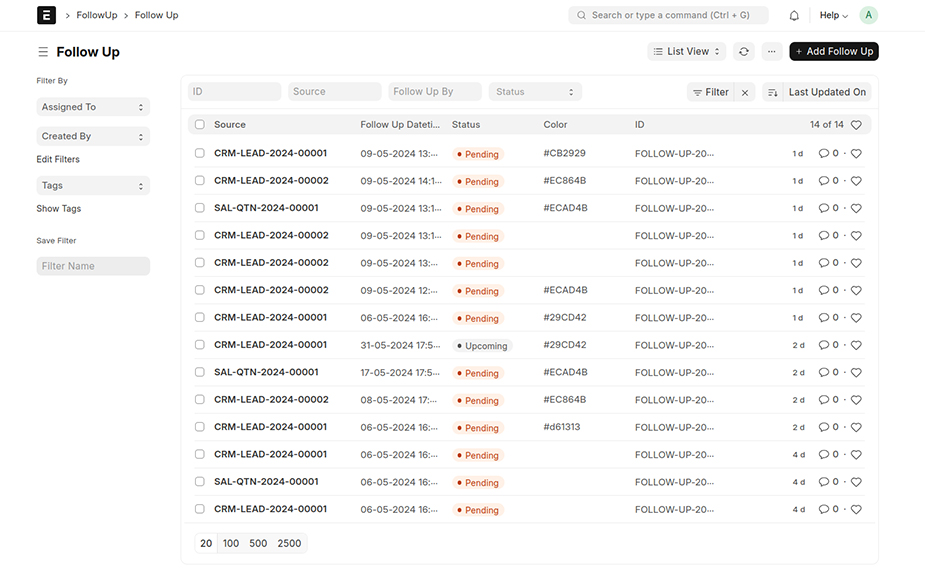
- In the Follow-Up list, you can view all existing follow-ups, remove existing ones, and make updates as necessary.
- The second option involves accessing the follow-up from the follow-up list. To add a new follow-up, click "Add Follow-Up" and create a new document.
05.02. Calendar View
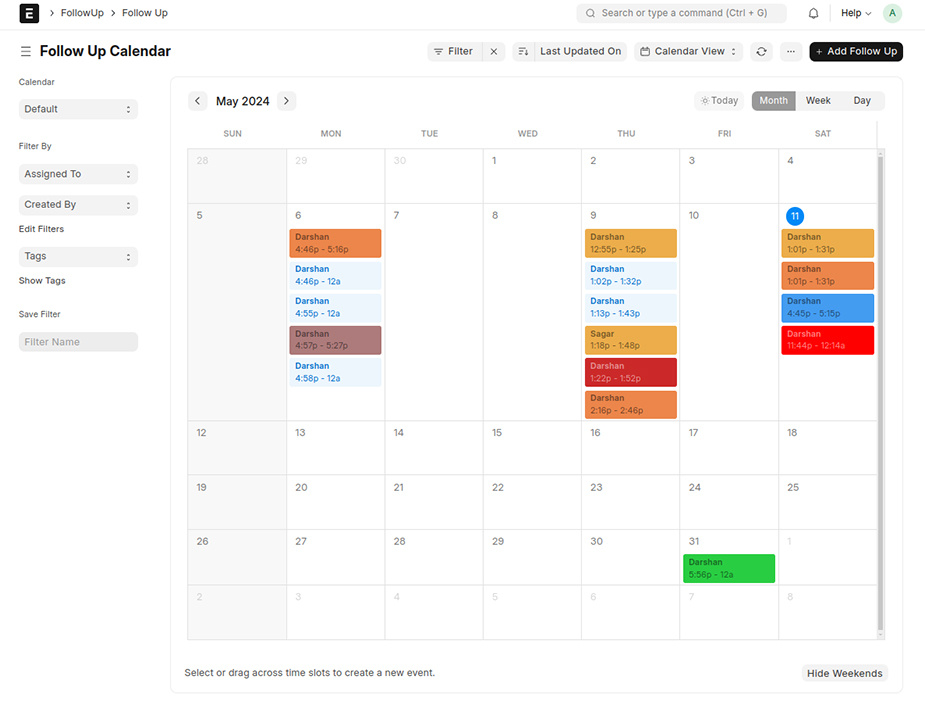
- The Calendar view provides a visual representation of all scheduled follow-ups. Users can easily reschedule follow-up events by dragging and dropping them. Additionally, follow-ups can be color-coded based on the color selected in the follow-up form.
05.03. Gantt View
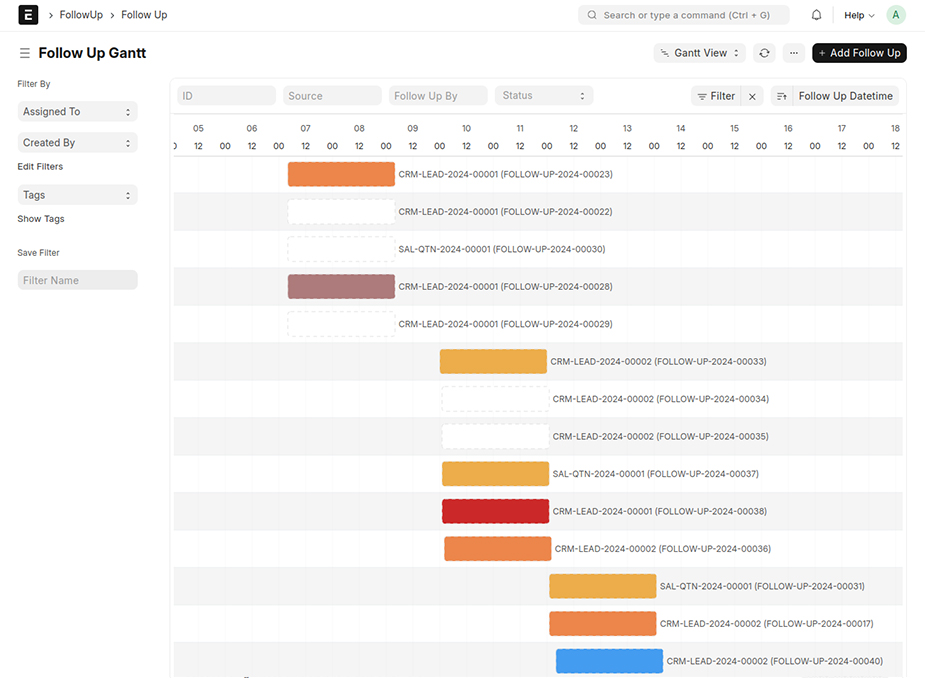
- The Gantt View is a powerful tool for follow-up management. It provides a visual representation of scheduled follow-ups and their progress. Users can easily reschedule follow-up events by dragging and dropping them.
05.04. Kanban View
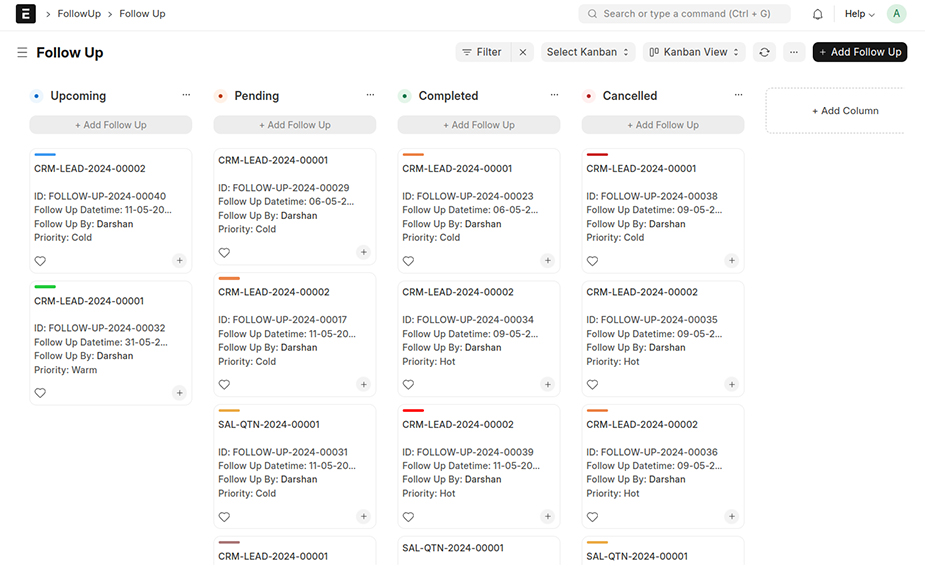
- The Kanban view is a visual and intuitive tool for managing follow-up tasks, ensuring that no tasks are missed and enhancing overall efficiency and productivity.
05.05. Follow Up Screen
- This is the view of the follow-up form where you can create and showcase follow-up information.
05.06. Follow Up Fields
| Field Name | Description |
|---|---|
| Follow Up From | Follow Up From. Like from Lead or Quotation. |
| Lead | Link with lead doctype to create from lead doctype. |
| Follow Up By | Who is responsible for the follow-up? Please link the user here. |
| Color | Set the color for Gantt and Calendar view. |
| User Name | Fetch the name from the linked follow-up by the user. |
| Priority | Set priority for follow-up. Hot / Cold / Warm. |
| Status | Set the status as per requirement. Like follow-up is complete — set status to Completed. |
| Communication Type | Set the type of communication. |
| Follow Up Datetime | Set a date & time for a reminder. |
| Follow Up End Datetime | The default end time is automatically set to 30 minutes after the start time. |
| Sent Reminder | If a reminder has been sent, this checkbox will be automatically ticked. |
| Remarks | Set notes for follow-up. |
05.07. Follow Up Status
| Status Name | Description |
|---|---|
| Upcoming | By default, the status is Upcoming — set for future follow-up. |
| Pending | If the follow-up is not taken before the follow-up date & time, the status will automatically be set to Pending. |
| Completed | If follow-up is complete then the status is marked as Completed. |
| Cancelled | If a follow-up is canceled, the status is set to "Cancelled." |
05.08. Follow Up Priority
| Priority Name | Description |
|---|---|
| Cold | If the follow-up priority is low, it is set as "Cold". |
| Hot | If the follow-up priority is high, it is set as "Hot". |
| Warm | If the follow-up priority is medium, it is set as "Warm". |
05.09. Communication Type
| Type | Description |
|---|---|
| Call | If a call is taken, the communication type is called "Call." |
| If the follow-up is conducted via email, the type is "Email." | |
| SMS | If the follow-up is conducted via SMS, the type is "SMS." |
| If the follow-up is conducted via Whatsapp, the type is "Whatsapp." | |
| Visit | If the follow-up is conducted via Field Visit, the type is "Visit." |
05.10. Reminder
- If the status is 'Upcoming,' email reminders and system notifications will be dispatched 30 minutes before the scheduled time specified in the follow-up date-time field.
- For the email reminder, we have to set the default email account.
05.11. Automatic Status Update
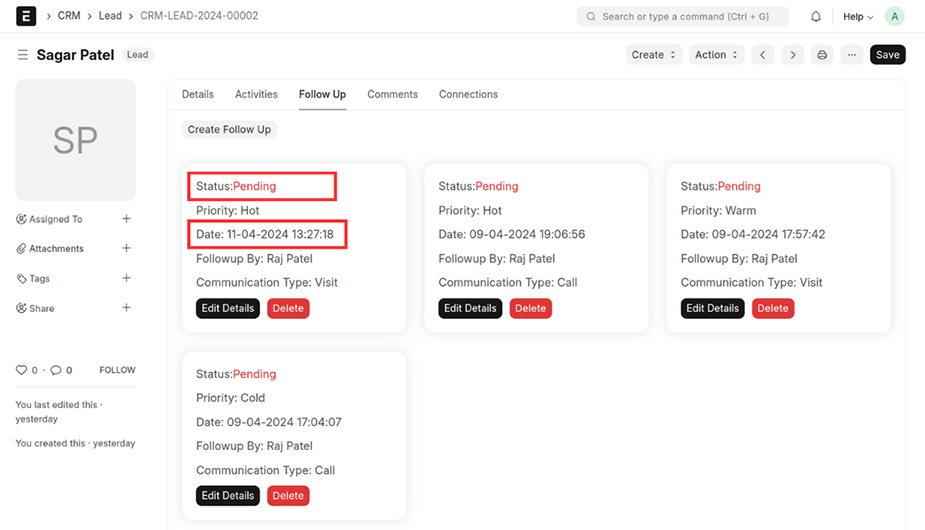
- If the follow-up is not taken before the follow-up date & time, the status will automatically be set to Pending.
06. Dashboard & Report
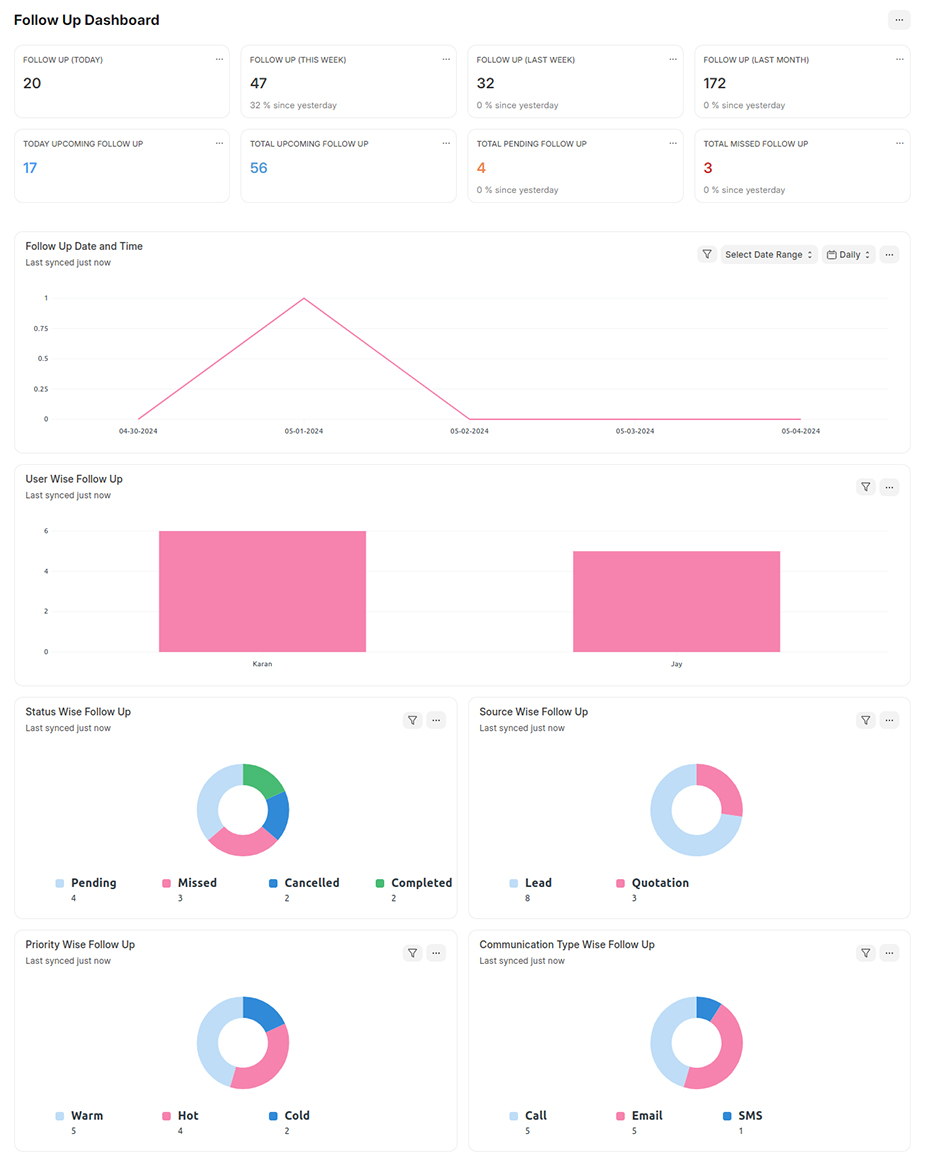
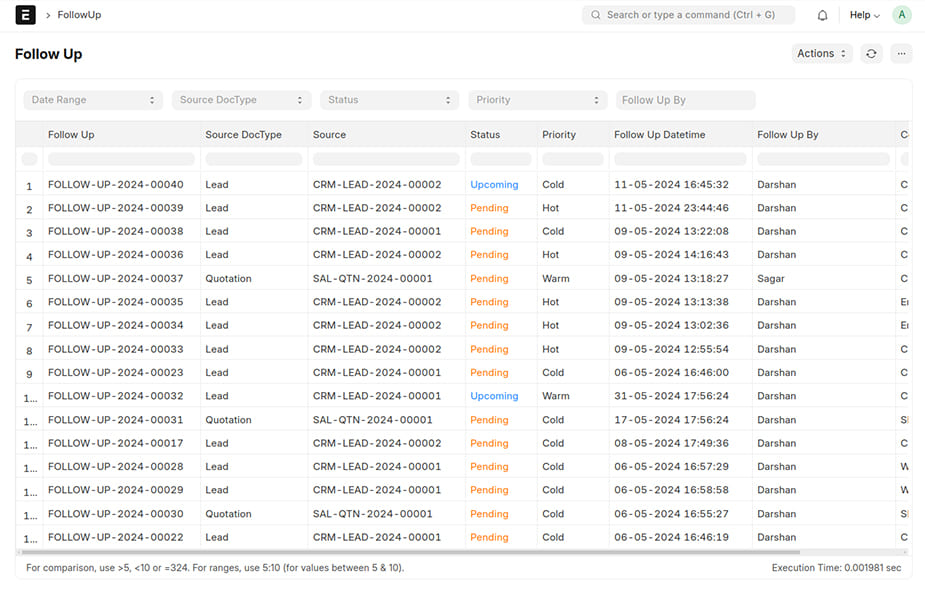
- The follow-up dashboard provides a centralized view of all follow-ups and their statuses across different forms. Dashboards use visual elements such as charts and graphs to present data in an easily digestible format, making it simpler to understand trends and patterns.
Support
FREQUENTLY ASKED QUESTIONS
Sales teams can use the 'Lead' section to create new follow-ups, update existing ones, and delete follow-ups as needed. This helps keep track of potential clients and ensure timely follow-ups.
Marketing teams can use the Calendar View to see a visual representation of all scheduled follow-ups. They can reschedule follow-up events and colour-code follow-ups for better organisation.
Follow-ups can be applied on the Lead form. You can create, update, and delete follow-ups within the Lead section to ensure timely communication with potential clients.
Yes, follow-ups can be applied to the Quotation form. You can manage follow-ups in the Quotation section using the same steps as for leads, ensuring that all quotations are followed up effectively.
Executives can use the dashboard to get a centralized view of all follow-ups and their statuses. The dashboard uses visual elements like charts and graphs to present data, making it easier to understand trends and performance metrics.


