Telephony API Communicate, Enhance Customer Satisfaction, Repeat!

Ever found yourself juggling customer details, trying to make that perfect call, and wishing for a simpler way to manage it all?
Ever found yourself juggling customer details, trying to make that perfect call, and wishing for a simpler way to manage it all?
That's why we're excited to introduce Sanskar Technolabs' game-changer: the integration of ERPNext with Tata Smart Flo's advanced calling system.

Make Call

Reject Call

Transfer Call

Hold Call

Un-hold Call

Mute Call

Un-mute Call
It helps you in having all your customer info in one place and make calls directly from your ERPNext system with just one click.
It's not just about calls; it's about building awesome relationships, offering lightning-fast support, and having all your data in one universal platform.
No more dealing with different platforms (for calling, tracking, and managing leads) or customers complaining about bad after-sales support —just seamless, efficient, and great customer satisfaction with our ERPNext calling integration product.
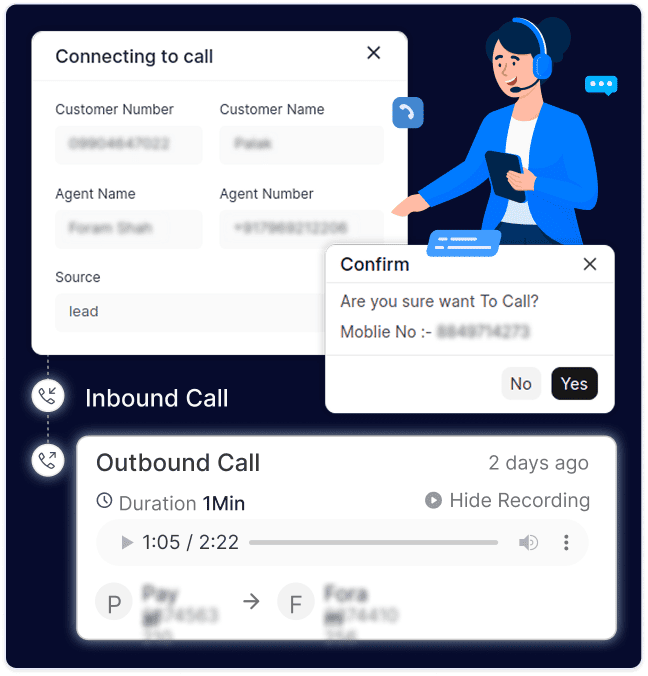
Direct Call Management
Streamline your workflow by making calls directly within the ERPNext system. No more dealing with different applications – enhance your efficiency and communication with this seamless feature.

Make calls directly from ERPNext & boost workflow efficiency
Eliminate the need to switch between applications.
Call Details Fetching
Automate your call log management effortlessly. All call details and recordings are automatically fetched and stored within ERPNext, ensuring easy access and quick reference at your fingertips.
Automatic fetching of call log details.
Simplified access to call recordings.
Comprehensive Dashboard
Gain a holistic view of your call statistics with our intuitive dashboard. Track daily, weekly, and monthly call metrics, including total answered calls, missed calls, incoming calls, and outgoing calls.
User-friendly dashboard design.
Daily, weekly, and monthly call statistics.
Insights into answered, missed, incoming, and outgoing calls.
Trend Analysis and Graphical Representations
Visualize call trends and patterns through graphical representations, offering valuable insights for better decision-making and understanding of communication dynamics.
Graphical representation of call trends.
Pie charts to know about the missed & answered calls.
Better understanding of communication patterns and informed decision-making.
One-Click Calling
Facilitate quick and efficient communication with the one-click calling feature. Empower your team to initiate calls effortlessly, improving customer interactions and response times.
Enable one-click calling for efficient communication.
Quick initiation of calls for improved interactions.
Enhanced response times.
Seamless Calling by Agents
With our one-of-a-kind integration, your agents can effortlessly initiate calls to potential customers. Enhance outreach efforts and improve customer engagement with this user-friendly and efficient calling feature.
Agents can initiate calls with ease.
Improve outreach efforts.
Enhance customer engagement through seamless calling.
Detailed Call Reports
Generate comprehensive call reports with detailed information such as personal details, reason for the call, date and time, call duration, call status, agent name, recording URL, and doctype linking.
Detailed call reports for in-depth insights.
Information on personal details, call reasons, and more.
Comprehensive documentation for analysis and review.
End-to-End Reports
Access customizable reports directly in your ERPNext with the ability to filter based on various criteria, including date, status, and call type. Gain tailored insights into your communication dynamics and optimize your strategies accordingly.
Customizable reports based on various criteria.
Filter reports by date, status, and call type.
Gain tailored insights for strategic optimization.
Before getting started with the process of installing and setting up the calling integration system within your ERPNext - you need to abide by the following:
Pre-requisites
2 APIs for calling & call logs
Authorization Key
Limit to fetch the data & call logs
Step 1:
Installing the App:
You need to install our calling integration on your Bench or Site.
Go to your bench or site, select app tabs > Add app > Search the app(Calling integration)
You can choose our app and install it easily (after making the payment).
Step 2:
Copy Two APIs from Tata Smart Flow:
Log in to the Tata Smart Flo system, and locate the API section. Copy the APIs for making calls and another for call logs.
Step 3:
Paste APIs in our App’s call setting:
Go to the app's call setting section in our dashboard and paste the previously copied APIs for making and managing calls.
Step 4:
Configure User Numbers for Calling:
Go to the app's call setting section in our dashboard and paste the previously copied APIs for making and managing calls.
Step 5:
Start making calls:
After adding the registered mobile numbers, you can start calling your customers with just one click.
TESTIMONIALS
Hear in their Words!
Direct call management eliminates the need to switch between applications or manage the contact and other personal details of customers. Our products let you access all the data in ERPNext and one-click calling to streamline your workflow and enhance communication efficiency.
You need to pay a nominal amount of $15 every month to access our calling integration product in your ERPNext system.
The call logs and call details will not be deleted until you decide to do it on your own. However, in the case of call recordings, they will be deleted after 180 days.
Absolutely, call details and recordings from Tata Smart Flo are automatically fetched and stored within ERPNext for simplified access and quick reference, at any time.
Visualizing call trends through graphs and charts helps in understanding communication patterns between the customers and agents and even your team, facilitating better decision-making and strategy-making when it comes to customer support and communications.
Yes, two or more agents can call at the same time from the system. The only prerequisite is that they should have their number registered in the Tata Smart Flo application.